How to change direct deposit
Login to ADP > Click on Myself > Click on Payment Options
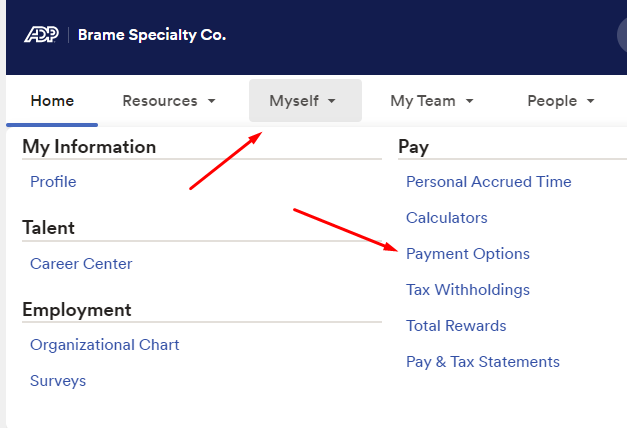
Once you’re on this screen you can select which account(s) you would like to change/edit.
If you continue to run into issues with changing your direct deposit you can contact MyLife Advisors
ADP offers the self-service tools you need to help get started. If you need support, we’re here for you! The common items we can help you with are:
- Password Resets & Registration
- Paychecks/Withholding
- Paid Time Off (PTO) requests and balances
- Navigate features available online or on mobile
- and so much more!
MyLife Advisors can be reached Monday – Friday from 8:00 am – 11:30 pm EST by phone or email.
(855) 547-8508
Thank you,
HR
Was this article helpful?
That’s Great!
Thank you for your feedback
Sorry! We couldn't be helpful
Thank you for your feedback
Feedback sent
We appreciate your effort and will try to fix the article